Software (Jira Java API)
Introduction
SQL for JIRA wraps the JIRA Software Java API for reporting (only GET methods are supported → Read-only). Therefore, it is intended for Request-based reports.
All the database tables are under the SOFTWARE schema. You have to join the PUBLIC schema tables to get JIRA Core/Business data related to issues, projects, versions, etc.
Consideration
The use of the JIRA Software tables is identical to the use of the Kambas or Scrum boards. This means that the results returned by the queries will be the same as if the boards are used directly.
For example, when planning a sprint, only tasks can be planned:
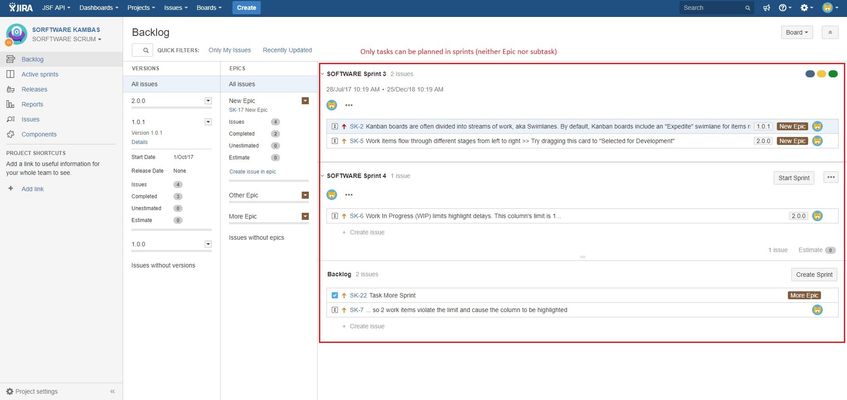
The subtasks take the sprint from the parent issue automatically; and the epics do not belong to any Sprint (because the epics can not be planned).
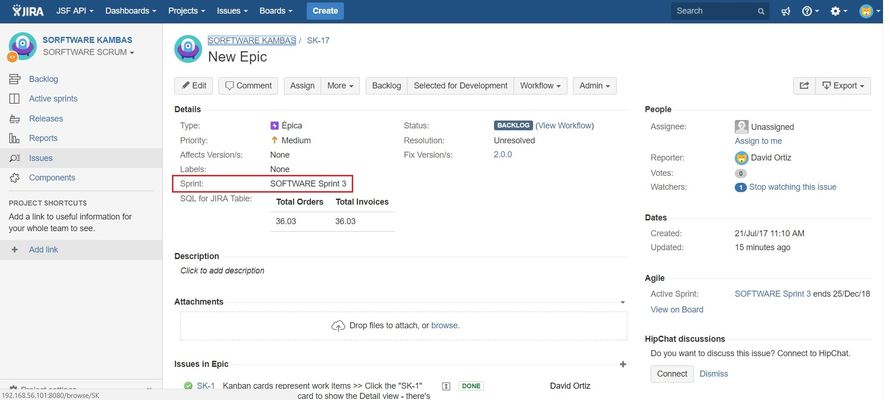
Even if you fill the custom field in Epic:
If we make a query to get the issues of sprint 3, we will get the following issues:
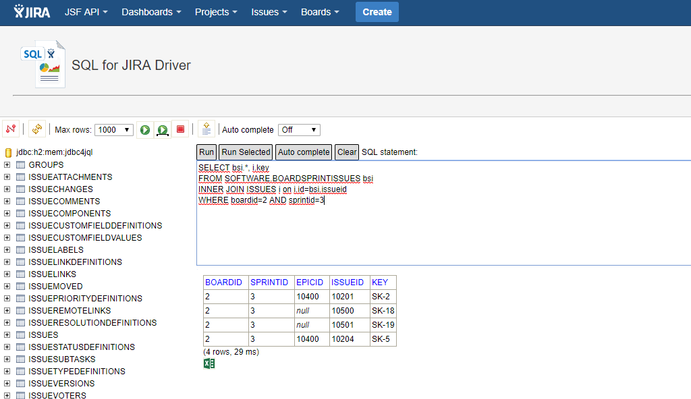
The results do not contain the epic, because sprints can only contain tasks (and their subtasks).
JIRA Software Documentation
You can consult the documentation of JIRA Software in the following link JIRA Software Server 7.4 documentation for more information.
Entity Relationship Diagram (ERD)
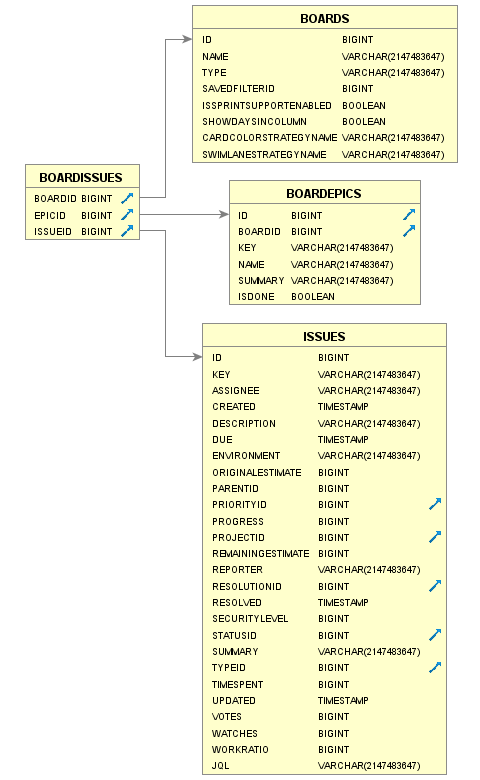
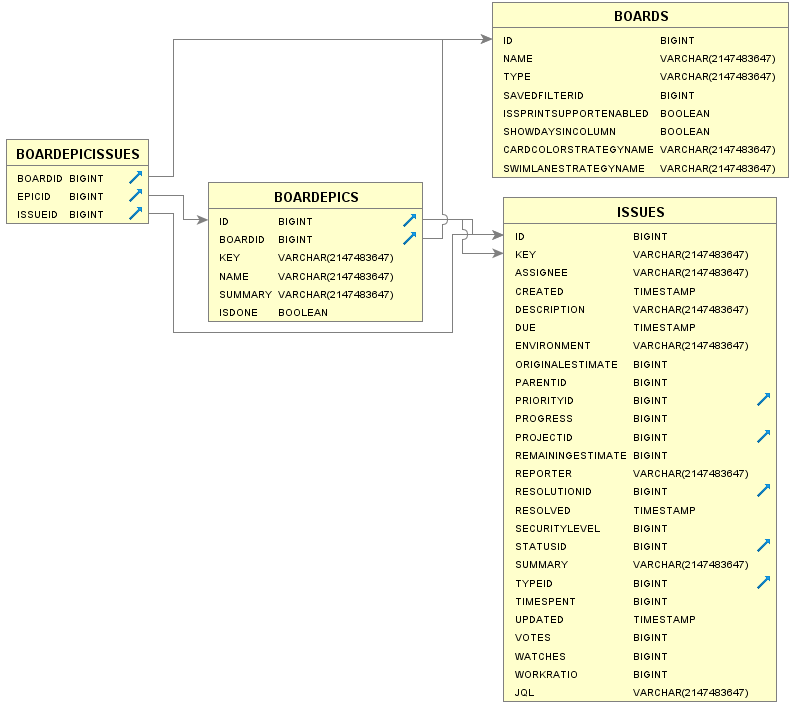
The model entity-relationship for Jira Software is as follows:

Epic Issues
| BOARDS | |||
|---|---|---|---|
| COLUMN | TYPE | INDEXES | |
| EPICID | BIGINT | X | The id of the Epic. |
| ISSUEID | BIGINT | The id of the Issue belonging to the Epic | |
The EPICISSUES table (available from the 9.8.0 version) is a convenient way of getting all the Issues belonging to a given Epic that performs better than the BOARDEPICISSUES table.
The EPICID must correspond to an Epic issue, otherwise, the table raises an error.
Boards
A board displays issues from one or more projects, giving you a flexible way of viewing, managing, and reporting on work in progress. There are two types of boards in JIRA Software:
- Scrum board — for teams that plan their work in sprints
- Kanban board — for teams that focus on managing and constraining their work-in-progress
(View What is a board?)

Columns
| BOARDS | |||
|---|---|---|---|
| COLUMN | TYPE | INDEXES | |
| ID | BIGINT | X | The id of the board. |
| NAME | VARCHAR | The name of the board. | |
| TYPE | VARCHAR | The type of the board. It could be either SCRUM or KANBAN. | |
| SAVEDFILTERID | BIGINT | The id of the filter that determines which issues belong to board. | |
| ISSPRINTSUPPORTENABLED | BOOLEAN | 'true' if the board supports sprints. | |
| SHOWDAYSINCOLUMN | BOOLEAN | 'true' if the board shows days in column. | |
| CARDCOLORSTRATEGYNAME | VARCHAR | The card color strategy name of the board. | |
| SWIMLANESTRATEGYNAME | VARCHAR | The swimlane strategy name of the board. | |
| BOARDFILTERS | |||
|---|---|---|---|
| COLUMN | TYPE | INDEXES | |
| ID | BIGINT | X | The id of the entity. |
| NAME | VARCHAR | The name of the entity. Must not be null or empty. | |
| DESCRIPTION | VARCHAR | General description of the entity. May be null or empty. | |
| OWNER | VARCHAR | Filter owner | |
| QUERY | VARCHAR | Gets the query that defines the search that will be performed for this filter. | |
| ISLOADED | BOOLEAN | 'true' if the filter has been loaded. | |
| ISMODIFIED | BOOLEAN | 'true' if the filter has been modified. | |
| FAVOURITECOUNT | BIGINT | The number of users who have marked this entity as one of their favourites. | |
Examples
SELECT *
FROM SOFTWARE.BOARDS

SELECT b.id as "Board Id.", b.name, bf.*
FROM SOFTWARE.BOARDS b
INNER JOIN SOFTWARE.BOARDFILTERS bf on b.SAVEDFILTERID = bf.ID
WHERE b.id=2

Board Projects
A board displays issues from one or more projects. You can know what projects are the issues your board shows.
(View Starting a new project, Leading an agile project)
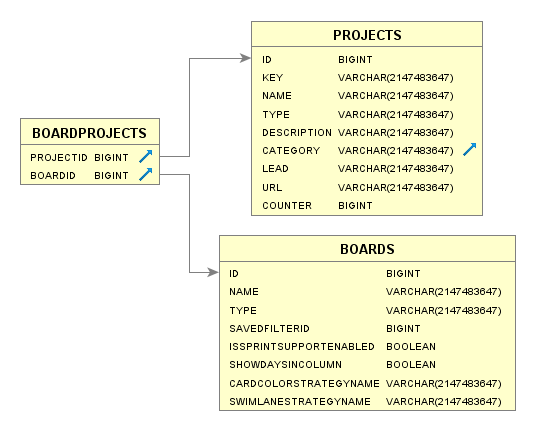
Columns
| BOARDPROJECTS | |||
|---|---|---|---|
| COLUMN | TYPE | INDEXES | |
| PROJECTID | BIGINT | X | Project identifier |
| BOARDID | BIGINT | X | Board identifier |
Examples
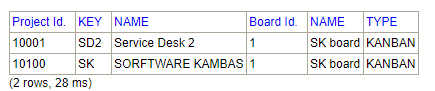
SELECT p.id as "Project Id.", p.key, p.name, b.id as "Board Id.", b.name, b.type
FROM SOFTWARE.BOARDPROJECTS bp
INNER JOIN PROJECTS p on p.id=bp.PROJECTID
INNER JOIN SOFTWARE.BOARDS b on b.id=bp.boardid
WHERE projectid = 10100

SELECT p.id as "Project Id.", p.key, p.name, b.id as "Board Id.", b.name, b.type
FROM SOFTWARE.BOARDPROJECTS bp
INNER JOIN PROJECTS p on p.id=bp.PROJECTID
INNER JOIN SOFTWARE.BOARDS b on b.id=bp.boardid
WHERE bp.boardid=1
Board Versions
Versions are points-in-time for a project. They help you schedule and organize your releases.
Once a version is created, and issues are assigned to it, a Releases link will be available in your project navigation sidebar.
Assigning issues to versions helps you plan the order in which new features (stories) for your application will be released to your customers.
(View Configuring versions in a Kanban project, Configuring versions in a Scrum project)
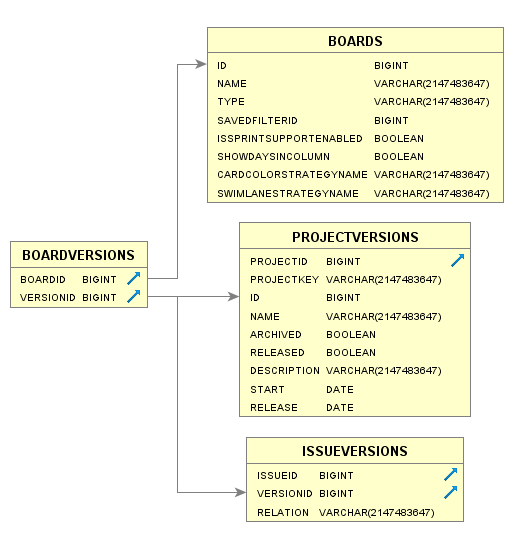
Columns
| BOARDVERSIONS | |||
|---|---|---|---|
| COLUMN | TYPE | INDEXES | |
| BOARDID | BIGINT | X | Board identifier. |
| VERSIONID | BIGINT | Version identifier | |
Examples
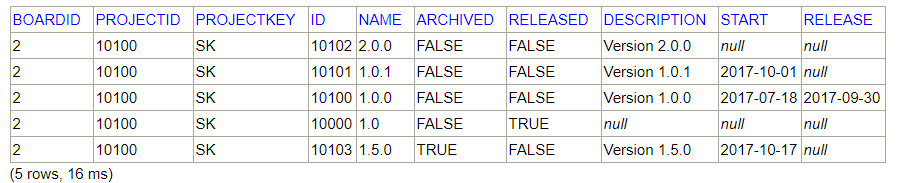
SELECT bv.boardid, pv.*
FROM SOFTWARE.BOARDVERSIONS bv
INNER JOIN PROJECTVERSIONS pv on bv.versionid=pv.id
where boardid=2
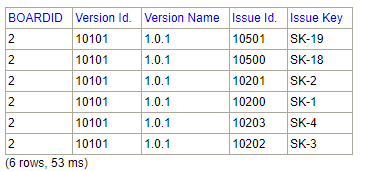
SELECT bv.boardid, pv.id as "Version Id.", pv.name as "Version Name", i.id as "Issue Id.", i.key as "Issue Key"
FROM SOFTWARE.BOARDVERSIONS bv
INNER JOIN PROJECTVERSIONS pv on pv.id = bv.versionid
INNER JOIN ISSUEVERSIONS iv on iv.versionid = bv.versionid
INNER JOIN issues i on i.id=iv.issueid
where boardid=2 and bv.versionid=10101
Board Columns
The vertical columns in both the Active sprints of a Scrum board and the Kanban board represent the workflow of your board's project.
The default columns in the Active Sprints of a Scrum board are To Do, In Progress, and Done.
The default columns on a Kanban board are Backlog, Selected for Development, In Progress, and Done.
(View Configuring columns, Configuring a board)
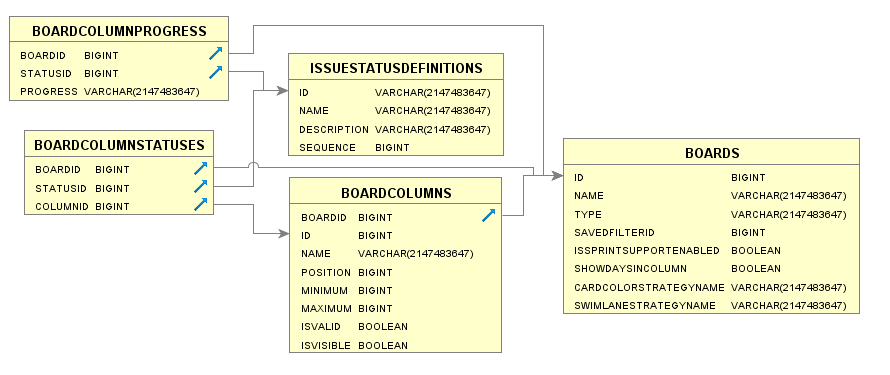
Columns
| BOARDCOLUMNS | |||
|---|---|---|---|
| COLUMN | TYPE | INDEXES | |
| BOARDID | BIGINT | X | Board identifier. |
| ID | BIGINT | Column Identifier. | |
| NAME | VARCHAR | Column name. | |
| POSITION | BIGINT | Column position. | |
| MINIMUM | BIGINT | Minimum number of issues in column. | |
| MAXIMUM | BIGINT | Maximum number of issues in column. | |
| ISVALID | BOOLEAN | 'true' if column is valid. | |
| ISVISIBLE | BOOLEAN | 'true' if column is visible. | |
| BOARDCOLUMNSTATUSES | |||
|---|---|---|---|
| COLUMN | TYPE | INDEXES | |
| BOARDID | BIGINT | X | Board identifier. |
| STATUSID | BIGINT | Status identifier. | |
| COLUMNID | BIGINT | Column Identifier. | |
| BOARDCOLUMNPROGRESS | |||
|---|---|---|---|
| COLUMN | TYPE | INDEXES | |
| BOARDID | BIGINT | X | Board identifier. |
| STATUSID | BIGINT | Status identifier. | |
| PROGRESS | VARCHAR | The breakdown of status mapped in the view to their respective Column Progress. | |
Examples
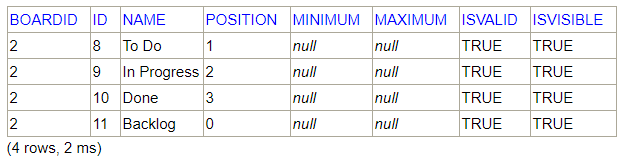
SELECT *
FROM SOFTWARE.BOARDCOLUMNS
WHERE boardid=2
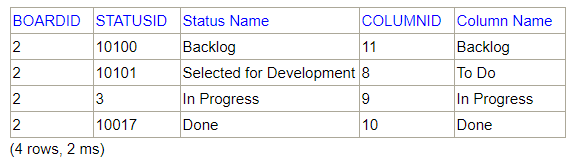
SELECT bcs.BOARDID, bcs.STATUSID, isd.NAME as "Status Name", bcs.COLUMNID, bc.NAME as "Column Name"
FROM SOFTWARE.BOARDCOLUMNSTATUSES bcs
INNER JOIN SOFTWARE.BOARDCOLUMNS bc on bc.ID = bcs.COLUMNID AND bc.BOARDID = bcs.BOARDID
INNER JOIN ISSUESTATUSDEFINITIONS isd on isd.ID = bcs.STATUSID
WHERE bcs.boardid=2
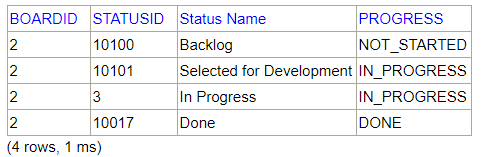
SELECT bcp.BOARDID, bcp.STATUSID, isd.name as "Status Name", bcp.PROGRESS
FROM SOFTWARE.BOARDCOLUMNPROGRESS bcp
INNER JOIN ISSUESTATUSDEFINITIONS isd on isd.ID = bcp.STATUSID
WHERE boardid=2
Explanation
In the process of resolving an issue:
- The "Backlog" status indicates that the problem is not being resolved.
- The "Selected for Development" and "In Progress" states that the issue is being resolved.
- The "Done" status indicates that the issue has been resolved.
Board Issues
You can get the issues of a certain board through the board identifier, regardless of the sprint, epic ... in which they are included.
There are particularities depending on the type of board:
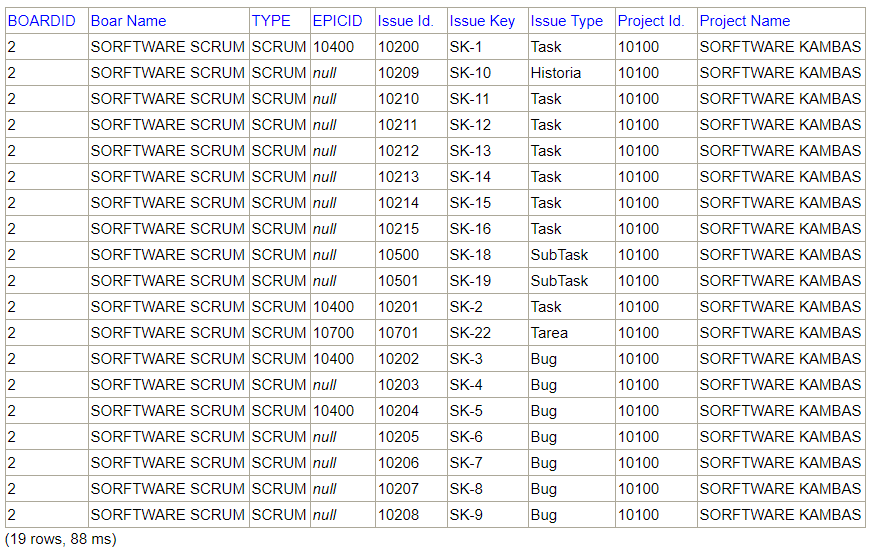
- Scrum board — the epics are not part of the set of issues.
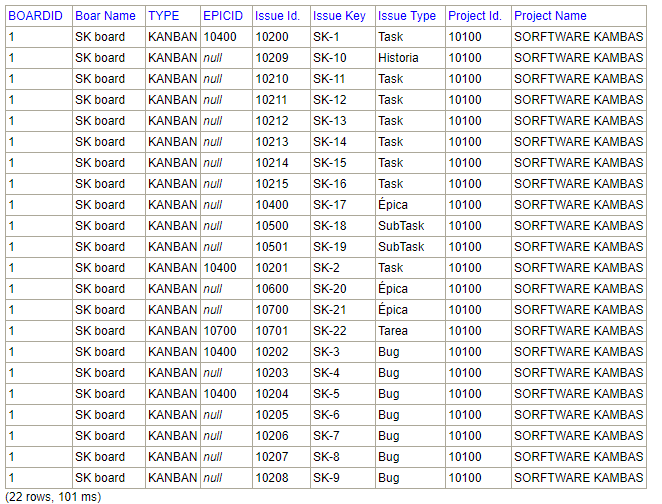
- Kanban board — the epics are part of the set of issues.
Columns
| BOARDISSUES | |||
|---|---|---|---|
| COLUMN | TYPE | INDEXES | |
| BOARDID | BIGINT | X | Board identifier. |
| EPICID | BIGINT | Epic identifier. | |
| ISSUEID | BIGINT | Issue identifier. | |
Examples
SELECT bi.boardid, b.name as "Boar Name", b.type, bi.epicid, i.id as "Issue Id.", i.key as "Issue Key", itd.name as "Issue Type", p.id as "Project Id.", p.name as "Project Name"
FROM SOFTWARE.BOARDISSUES bi
INNER JOIN SOFTWARE.BOARDS b on b.id=bi.boardid
INNER JOIN ISSUES i ON i.id=bi.issueid
INNER JOIN ISSUETYPEDEFINITIONS itd on itd.id=i.typeid
INNER JOIN PROJECTS p on p.id=i.projectid
WHERE boardid=2 order by i.key
SELECT bi.boardid, b.name as "Boar Name", b.type, bi.epicid, i.id as "Issue Id.", i.key as "Issue Key", itd.name as "Issue Type", p.id as "Project Id.", p.name as "Project Name"
FROM SOFTWARE.BOARDISSUES bi
INNER JOIN SOFTWARE.BOARDS b on b.id=bi.boardid
INNER JOIN ISSUES i ON i.id=bi.issueid
INNER JOIN ISSUETYPEDEFINITIONS itd on itd.id=i.typeid
INNER JOIN PROJECTS p on p.id=i.projectid
WHERE boardid=1 order by i.key
Board Backlog Issues
A backlog is simply a list of features, which could be for your product, service, project, etc.
These features are not detailed specifications. Rather, they are usually described in form of user stories, which are short summaries of the functionality from a particular user's perspective.
This is a common template for a user story: As a <type of user>, I want <goal> so that I <receive benefit>.
(View Building a backlog, Using your Kanban backlog, Using your Scrum backlog)
Only for Scrum boards.
The backlog is only functional for Scrum boards.
On Kanbam boards, the backlog is simply a board column that is mapped as a Backlog. So the table will not return results for Kanbam boards.
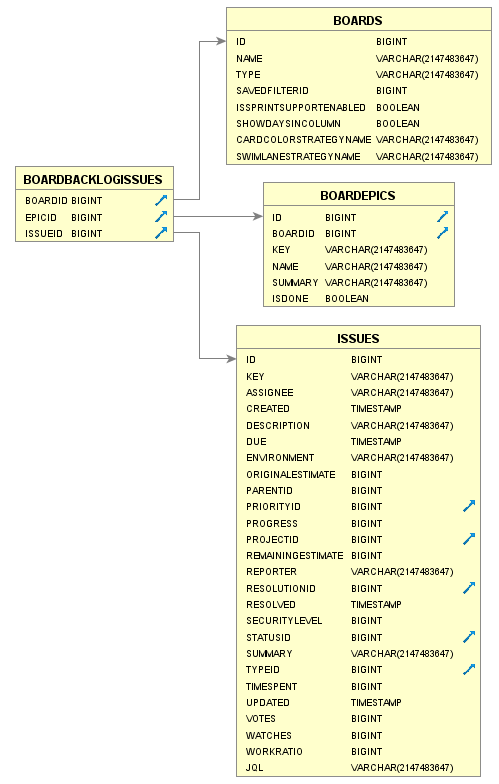
Columns
| BOARDBACKLOGISSUES | |||
|---|---|---|---|
| COLUMN | TYPE | INDEXES | |
| BOARDID | BIGINT | X | Board identifier. |
| EPICID | BIGINT | Epic identifier. | |
| ISSUEID | BIGINT | Issue identifier | |
Examples
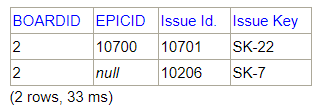
SELECT bbi.boardid, bbi.epicid, i.id as "Issue Id.", i.key as "Issue Key"
FROM SOFTWARE.BOARDBACKLOGISSUES bbi
INNER JOIN ISSUES i ON i.id=bbi.issueid
INNER JOIN ISSUETYPEDEFINITIONS itd on itd.id=i.typeid
WHERE boardid=2
Board Sprints
A sprint — also known as an iteration — is a short period in which the development team implements and delivers a discrete and potentially shippable application increment.
Note, sprints do not apply to Kanban projects.
(View Running sprints in a Scrum project, Planning sprints)
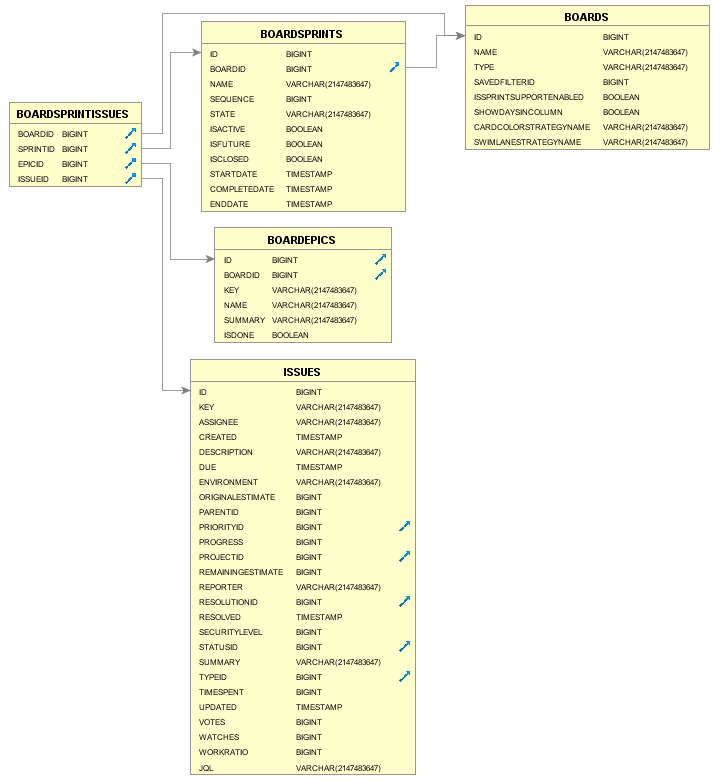
Columns
| BOARDSPRINTS | |||
|---|---|---|---|
| COLUMN | TYPE | INDEXES | |
| ID | BIGINT | X | Sprint identifier. |
| BOARDID | BIGINT | X | Board identifier. |
| NAME | VARCHAR | The name of the sprint. | |
| SEQUENCE | BIGINT | The number which determine sprints order in the backlog. Initially is equal to the sprint id. | |
| STATE | VARCHAR | The state of the sprint. | |
| ISACTIVE | BOOLEAN | 'true' if sprint is active. | |
| ISFUTURE | BOOLEAN | 'true' if sprint hasn't been started yet. | |
| ISCLOSED | BOOLEAN | 'true' if sprint has been completed. | |
| STARTDATE | TIMESTAMP | The date when the sprint suppose to start. May be null if sprint hasn't been started. | |
| COMPLETEDATE | TIMESTAMP | The date when sprint was completed. May be null if sprint hasn't been closed. | |
| ENDDATE | TIMESTAMP | The date when the sprint suppose to end. May be null if sprint hasn't been started. | |
| BOARDSPRINTISSUES | |||
|---|---|---|---|
| COLUMN | TYPE | INDEXES | |
| BOARDID | BIGINT | X | Board identifier. |
| SPRINTID | BIGINT | X | Sprint identifier. |
| EPICID | BIGINT | Epic identifier. | |
| ISSUEID | BIGINT | Issue identifier. | |
| X | Double index | ||
Examples
SELECT *
FROM SOFTWARE.BOARDSPRINTS
WHERE boardid=2

The following is a case that should be taken into account for future querys:
Get issues for Sprint 1:
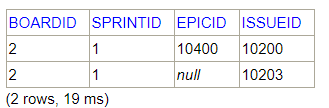
Get issues for sprint 1SELECT bsi.* FROM SOFTWARE.BOARDSPRINTISSUES bsi WHERE bsi.boardid=2 and bsi.sprintid=1
Get issues for Sprint 2:
Get issues for Sprint 2SELECT bsi.* FROM SOFTWARE.BOARDSPRINTISSUES bsi WHERE bsi.boardid=2 and bsi.sprintid=2
Get issues for closed sprints:
Get issues for closed sprintsSELECT bs.BOARDID, bs.ID as "Sprint Id.", bsi.ISSUEID FROM SOFTWARE.BOARDSPRINTS bs INNER JOIN SOFTWARE.BOARDSPRINTISSUES bsi on bsi.sprintid = bs.id AND bsi.boardid=bs.id WHERE bs.boardid=2 AND bs.isclosed=true
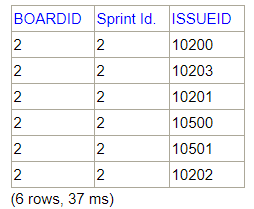
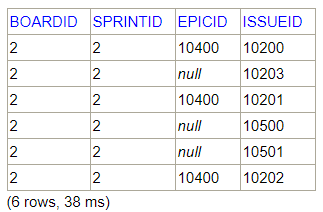
In query three, we only get sprint issues two, although the sprint one has two issues. If we extend the information returned by query one, we can see the following:
Query one extended:
Get issues for Sprint 1 EXTENDEDSELECT bsi.*, icv.VALUE as "Epic Link" FROM SOFTWARE.BOARDSPRINTISSUES bsi INNER JOIN ISSUECUSTOMFIELDVALUES icv on icv.issueid = bsi.issueid and icv.CUSTOMFIELDID =10128 -- CUSTOMFIELDID for Epic Link WHERE bsi.boardid=2 and bsi.sprintid=1

The issues 10200 and 10203 are in sprints 1 and 2.
When a sprint is not specified, as in this case, JIRA assumes that the issue belongs to the last closed sprint. In this case Sprint 2, although the issue belongs to more than one sprint closed.
Therefore, we must take into account:
- A issue may hold one and only one active or future sprint.
- An issue may hold several closed sprints. For JIRA, the issue belongs to the last closed sprint indicated in the issue.
Board Epics
An epic is a large body of work that can be broken down into a number of smaller stories. For example, performance-related work in a release.
An epic can span more than one project, if multiple projects are included in the board to which the epic belongs.
Unlike sprints, epics often change in scope over time as a natural aspect of agile development. Epics are almost always delivered over a set of sprints.
As a team learns more about an epic through development and customer feedback, user stories will be added and removed to optimize the team's release time.
(View Epics, stories, versions, and sprints, Working with epics)
Columns
| BOARDEPICS | |||
|---|---|---|---|
| COLUMN | TYPE | INDEXES | |
| ID | BIGINT | The issue id of epic. | |
| BOARDID | BIGINT | X | Board identifier. |
| KEY | VARCHAR | The issue key of epic. | |
| NAME | VARCHAR | The epic's name. | |
| SUMMARY | VARCHAR | the issue summary of epic. | |
| ISDONE | BOOLEAN | Done status of the epic. If the epic is done it will not be displayed on board. | |
| BOARDEPICISSUES | |||
|---|---|---|---|
| COLUMN | TYPE | INDEXES | |
| BOARDID | BIGINT | X | Board identifier. |
| EPICID | BIGINT | X | Epic identifier. |
| ISSUEID | BIGINT | Issue identifier. | |
| X | Double index | ||
Example with dynamic JQL joining
Some users have reported that the BOARDEPICISSUES table does not perform well. In this case, use dynamic JQL joining instead, to achieve the dame result:
select
  issuelink(key) as "Epic",
  link(jql.issue) as "Issue"
from
    software.boardepics e
  join
    JQL on JQL.query = ' "Epic Link" = ' || key
where e.boardid = <boardid>
The example above returns all the issues belonging to an Epic in a given board.
Examples
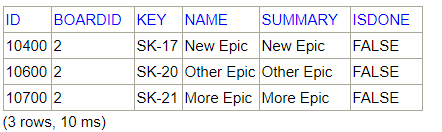
SELECT *
FROM SOFTWARE.BOARDEPICS
WHERE boardid=2
SELECT bei.boardid, bei.epicid,i.id as "Issue Id.", i.key as "Issue Key", i.summary as "Issue Summary"
FROM SOFTWARE.BOARDEPICISSUES bei
INNER JOIN ISSUES i on i.id = bei.issueid
WHERE bei.boardid=2 AND bei.epicid=10400

SELECT bei.boardid, bei.epicid, be.key as "Epic Key", be.name as "Epic Name", i.id as "Issue Id.", i.key as "Issue Key", i.summary as "Issue Summary"
FROM SOFTWARE.BOARDEPICS be
INNER JOIN SOFTWARE.BOARDEPICISSUES bei on bei.boardid=be.boardid and bei.epicid=be.id
INNER JOIN ISSUES i on i.id = bei.issueid
WHERE be.boardid=2
ORDER BY bei.boardid, bei.epicid, i.id ASC

Software Information
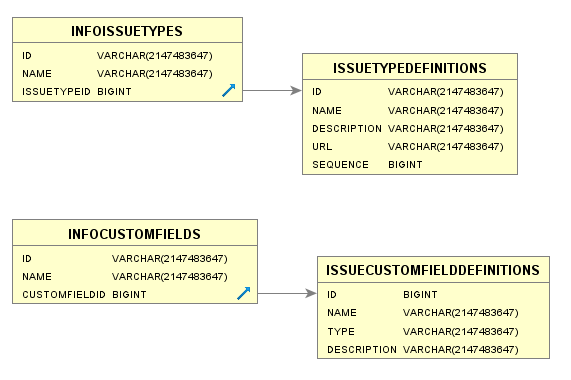
The "INFO*" tables return information about the own elements used by JIRA Software, such as custom fields and issue types.
These tables are useful when we want to extract only information from JIRA Software's own elements.
Columns
| INFOCUSTOMFIELDS | |||
|---|---|---|---|
| COLUMN | TYPE | INDEXES | |
| ID | VARCHAR | Element identifier text. | |
| NAME | VARCHAR | Custom field name. | |
| CUSTOMFIELDID | BIGINT | Custom field identifier. | |
| INFOISSUETYPES | |||
|---|---|---|---|
| COLUMN | TYPE | INDEXES | |
| ID | VARCHAR | Element identifier text. | |
| NAME | VARCHAR | Issue type name. | |
| ISSUETYPEID | BIGINT | Issue type identifier. | |
Examples
SELECT icf.customfieldid, icfd.name, icfd.type
FROM SOFTWARE.INFOCUSTOMFIELDS icf
INNER JOIN ISSUECUSTOMFIELDDEFINITIONS icfd on icfd.id = icf.customfieldid
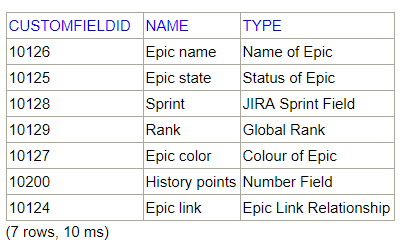
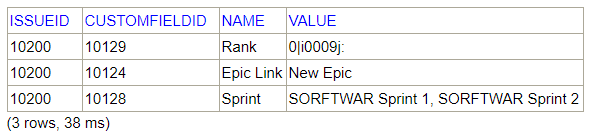
SELECT icfv.issueid, icfv.CUSTOMFIELDID, icf.name, icfv.value
FROM SOFTWARE.INFOCUSTOMFIELDS icf
INNER JOIN ISSUECUSTOMFIELDVALUES icfv on icfv.CUSTOMFIELDID = icf.customfieldid
WHERE icfv.issueid=10200
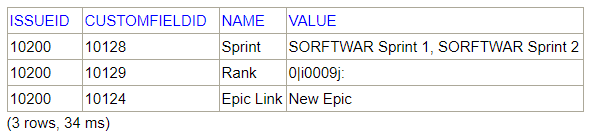
This query could have been performed without using the SOFTWARE.INFOCUSTOMFIELDS table:
SELECT  icfv.issueid, icfv.customfieldid, icfd.name, icfv.value
FROM ISSUECUSTOMFIELDVALUES icfv
INNER JOIN ISSUECUSTOMFIELDDEFINITIONS icfd on icfd.id = icfv.customfieldid
WHERE icfv.issueid=10200 AND icfv.CUSTOMFIELDID in (10128, 10129, 10124)